Standard Operating Procedure Software for Manufacturers

Digital SOPs with built-in training, sign-off and ISO 9001 compliance

Stop relying on paper folders, dusty Word documents and "I forgot to tell them" training. With Fraction ERP, you can build digital SOPs, track who's been trained on what revision, and prove your quality system to auditors — all inside the ERP your team already uses.

Step-by-step procedures

Revision control

Training & sign-off

ISO 9001 ready

What is SOP Software?

A Standard Operating Procedure (SOP) is a documented set of instructions that describes how a specific task should be performed — consistently, safely and to the right quality. SOP software replaces paper folders, network drives full of Word documents and PDF binders with a single, controlled, searchable system.

A modern SOP system should give you:

  • One controlled version of every procedure, accessible to the right people
  • A clear audit trail of who wrote, approved and read each revision
  • Training records that prove your team has been signed off on the latest version
  • Mobile-friendly access from the shop floor, not just the office

Done well, SOP software stops being "paperwork for the auditor" and starts being how your team actually works.

Why Paper and PDF SOPs Fail

Most manufacturers still rely on paper folders, shared drives or static PDFs for their procedures. The problems show up fast:

Old Revisions Stay in Use

Operators work from outdated copies because nobody knows which version is current.

No Proof of Training

No record of who has read or been trained on which version of which procedure.

Audit-Day Panic

Hours wasted printing, signing and back-filling records before every ISO 9001 audit.

Not Where the Work Happens

SOPs locked in an office binder are useless to operators on the shop floor.

Text-Only, No Visuals

A wall of text is a poor way to teach a hands-on task. Photos and videos are missing.

No Re-Training Trigger

When a procedure changes, there's no system to alert affected staff and re-collect sign-offs.

What Great SOP Software Should Do

A real SOP system has to do more than store documents. It has to control them, train people on them and prove it.

Structured Content

  • Numbered steps, not walls of text
  • Caution and warning markers
  • Photos and videos per step

Controlled Approvals

  • Draft / approved / revoked states
  • Frozen revision snapshots
  • Change summary on every revision

Training & Sign-Off

  • Per-user assignment
  • One-click "I have read and understood"
  • Re-training trigger on revision

Compliance KPIs

  • Compliance percentage at a glance
  • Outstanding training count
  • Department-level filtering

Where the Work Happens

  • Shop floor mobile access
  • Personal "My SOPs" page
  • Sign-off without leaving the bench

Inside Your ERP

  • Same login, same users
  • No separate compliance tool to pay for
  • Linked to your quality and production data

SOPs in Fraction ERP

Built into the ERP your team already uses — not bolted on as a separate compliance tool.

Step-by-Step Procedures with Media

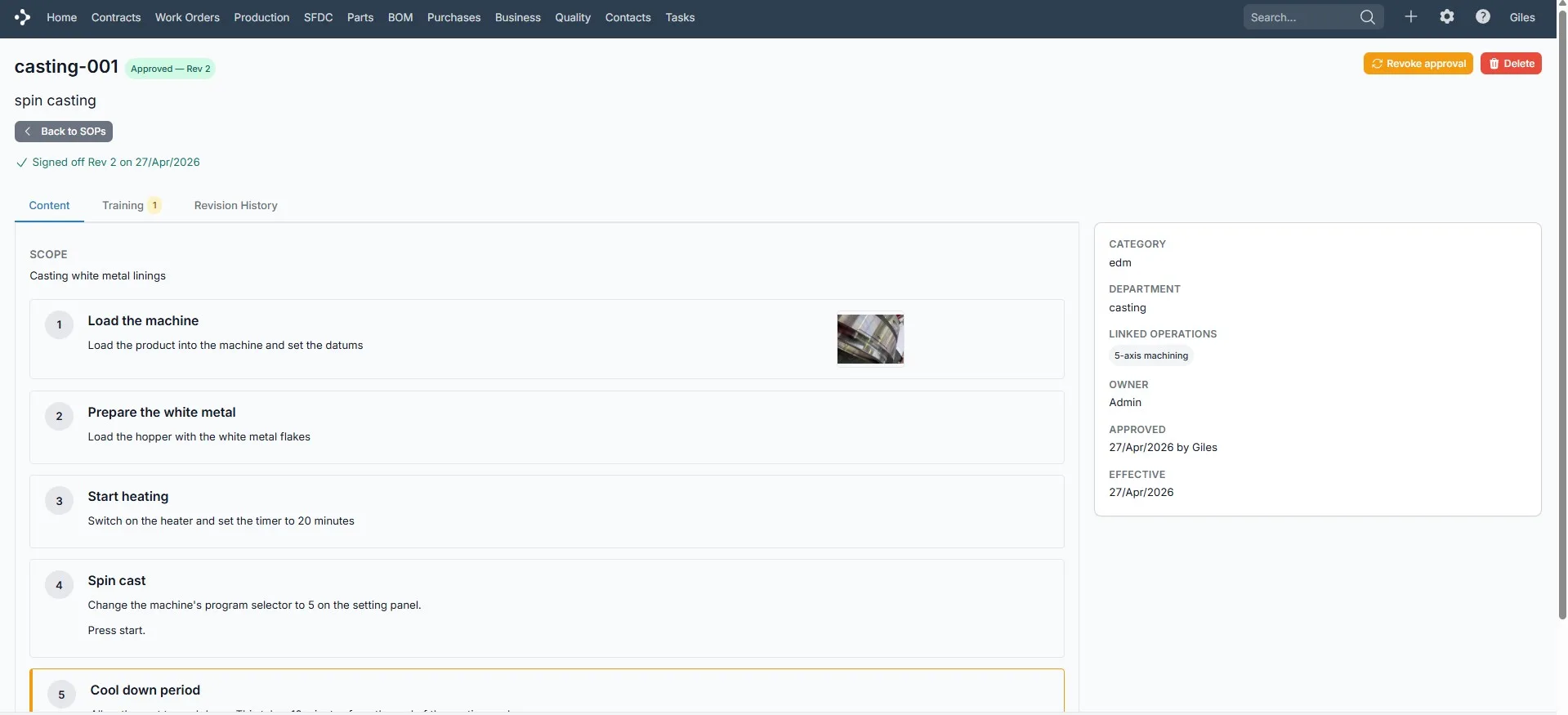
Build SOPs as ordered steps, not blocks of text. Each step has its own title, instructions and media.

  • Drag-and-drop step reordering
  • Mark steps as Normal, Caution or Warning
  • Attach photos, PDFs and videos per step
  • Click-to-edit inline on the show page

Approval and Revision Control

Every approval freezes a snapshot of the procedure — content, files, change summary — so you can prove what was in force on any given date.

  • Draft, approved and revoked states
  • Revision counter bumps only on re-approval
  • Change summary required on every new revision
  • Browse historical revisions exactly as published

Training Assignments and Sign-Off

Assign SOPs to specific users. Each person signs off "I have read and understood Rev N" with a single click — and that record is locked to that exact revision.

  • Per-user assignment, no roles or guessing
  • Status: not trained / trained / re-training required
  • Approver opt-in re-training trigger on new revision
  • Personal "My SOPs" page with pending vs completed

Compliance KPIs at the Top of the List

Three live KPI cards sit on the SOP list: Compliance %, Outstanding sign-offs and Re-training pending. Filter by department to drill in fast.

  • Compliance percentage live, no spreadsheet
  • Re-training card highlighted when count > 0
  • Per-row compliance and outstanding columns
  • Status, category and department filters

Built for the Shop Floor, Not Just the Office

SOPs are accessible to every employee — including unlimited free shop floor data capture (SFDC) users. Operators can read the procedure and sign off from a tablet or phone next to the machine, without needing a full ERP licence.

  • Mobile-first "My SOPs" page
  • Pending sign-offs at the top, completed below
  • SFDC users included — no extra cost per operator
  • Photos and videos render inline, no downloads

Built for ISO 9001 Audits

Stop dreading the auditor's visit. Fraction ERP keeps the records they ask for, in the form they expect.

Documented Procedures

Every SOP has an owner, category, department and an effective approval date — exactly what clause 7.5 expects.

Document Control

Frozen revision snapshots prove what was in force on any date — no "we lost the old version" excuses.

Competence Records

Per-user sign-off records demonstrate competence (clause 7.2) without paper training matrices.

Change Summaries

A required reason-for-change on every revision means the audit trail tells a story, not just a list of dates.

Re-Training on Change

When a procedure materially changes, trigger re-training in one click and watch the compliance KPI close again.

Connected to Quality

SOPs sit alongside non-conformance reports, calibration logs and traceability — one quality system, not five.

Who Uses SOPs in Manufacturing

Any manufacturer with repeatable processes and trained operators benefits — these are the patterns we see most often.

Injection Moulding

  • Tool change procedures with photos
  • Material handling and regrind handling SOPs
  • Operator sign-off per machine

Precision Engineering

  • Inspection routines with caution markers
  • Setup sheets with annotated photos
  • Audit-ready document control

Assembly & Fabrication

  • Standard build sequences for repeat work
  • Health and safety sign-offs
  • Onboarding new operators faster

Multi-Department Operations

  • Filter SOPs by department
  • Department-level compliance scores
  • Operations, quality, dispatch — all in one

Fraction ERP vs Paper & PDF SOPs

Paper & PDF SOPs Fraction ERP
"Which version is current?" One controlled approved version, always
No proof anyone read it Per-user sign-off locked to the revision
Audit-day printing panic Compliance KPIs always visible
Text-only, no photos or video Photos and video per step, inline
Stuck in the office binder Mobile access on the shop floor
Separate tool to license and learn Built into the ERP your team already uses

Included on Pro and Moulding plans

SOP management is part of our Pro and Moulding Edition plans — no separate licence, no per-user training fee. Shop floor data capture users are included free, so every operator can read and sign off on procedures from a tablet next to the machine.

View pricing

Frequently Asked Questions

What is SOP software?

SOP software replaces paper procedures and PDF binders with a controlled, searchable system. It manages document approvals and revisions, assigns training to users, captures their sign-off and gives you an audit trail you can show an ISO 9001 assessor.

How does Fraction ERP track SOP training?

A manager assigns an SOP to specific users. Each user signs off "I have read and understood Rev N" with one click; that record is locked to that exact revision. When the SOP is re-approved with material changes, the manager can flip everyone back to "re-training required" in one step.

How are SOP revisions managed?

Every approval freezes a snapshot of the SOP — content, steps, files and a required change summary. Revision numbers only bump on re-approval, so the version that was in force on any historical date can always be retrieved.

Does Fraction ERP support ISO 9001 quality management?

Yes. The SOP module covers documented information (clause 7.5) and competence records (clause 7.2). Combined with non-conformance reports, calibration logs and traceability, Fraction ERP gives you a single connected quality system instead of a stack of disconnected tools.

Can shop floor operators access SOPs on a tablet?

Yes. Every employee — including unlimited free shop floor data capture (SFDC) users — can open their personal "My SOPs" page on a phone or tablet, read the procedure with embedded photos and videos, and sign off without needing a full ERP licence.

Which Fraction ERP plans include SOPs?

SOP management is included on the Pro plan and the Moulding Edition. There is no separate licence and no per-user training fee. See full pricing.

Bring Your Procedures Into the 21st Century

Replace paper folders, PDF binders and missed training with a digital SOP system that proves your quality every day, not just on audit day.